
Skip to content
  • Contact Us
Institute of Ergonomics and Hygiene

Institute of Ergonomics and Hygiene

Quality Work and Healthy Life for All

  • Knowledge Hub
    • Ergonomics and Human Factors
    • Occupational Hygiene
    • Workplace Safety Health
    • All Tools
  • Consultancy
    • Ergonomics and Human Factors Services
    • Occupational Hygiene Services
    • Workplace Safety and Health Services
  • Training
    • Courses
    • OHTA Courses
      • OHTA201 Basic Principles in Occupational Hygiene
      • OHTA501 Measurement of Hazardous Substances
      • OHTA502 Thermal Environment
      • OHTA503 Noise – Measurement and its Effects
      • OHTA505 Control of Hazardous Substances
      • OHTA506 Ergonomics Essentials
      • OHTA507 Health Effects of Hazardous Substances
    • Trainers
    • Training Centre
  • Products
    • Casella
    • Exoskeleton
  • About Us
    • Consultants
    • Management
    • Ergonomics and Hygiene Conference
    • News & Events
  • Contact Us
  • Toggle search form
Multi-Monitor Viewing Distance Advisor | IEH Ergonomics Tool
IEH Ergonomics Tool

Multi-Monitor Viewing Distance Advisor

Estimate a suitable viewing distance for one, two or three monitors based on screen size, aspect ratio, portrait or landscape orientation, and field-of-view criteria used in ergonomics and human factors design.

Why multi-monitor distance matters

A multi-monitor workstation can improve productivity, but it can also increase visual span, neck rotation and eye movement if the monitors are too large, too close or arranged poorly.

This tool calculates the recommended viewing distance using the combined display envelope of the monitors selected by the user. This gives a more realistic recommendation than using a single generic arm’s-length rule.

Design basis used in this tool

The calculation applies your consolidated viewing-angle basis: vertical optimal field of view from 0° to -30°, vertical secondary field of view from +10° to -60°, horizontal optimal field of view of ±45°. The ±35° horizontal value is retained as a more conservative reference value for comparison.
Vertical optimal 0° to -30°

No head rotation, with the screen generally below the horizontal eye line.

Vertical secondary +10° to -60°

Acceptable for easy head movement or reclined sitting postures.

Horizontal optimal ±45°

Preferred horizontal viewing zone applied by this tool for the full monitor arrangement.

Horizontal reference ±35°

More conservative horizontal reference value retained for comparison.
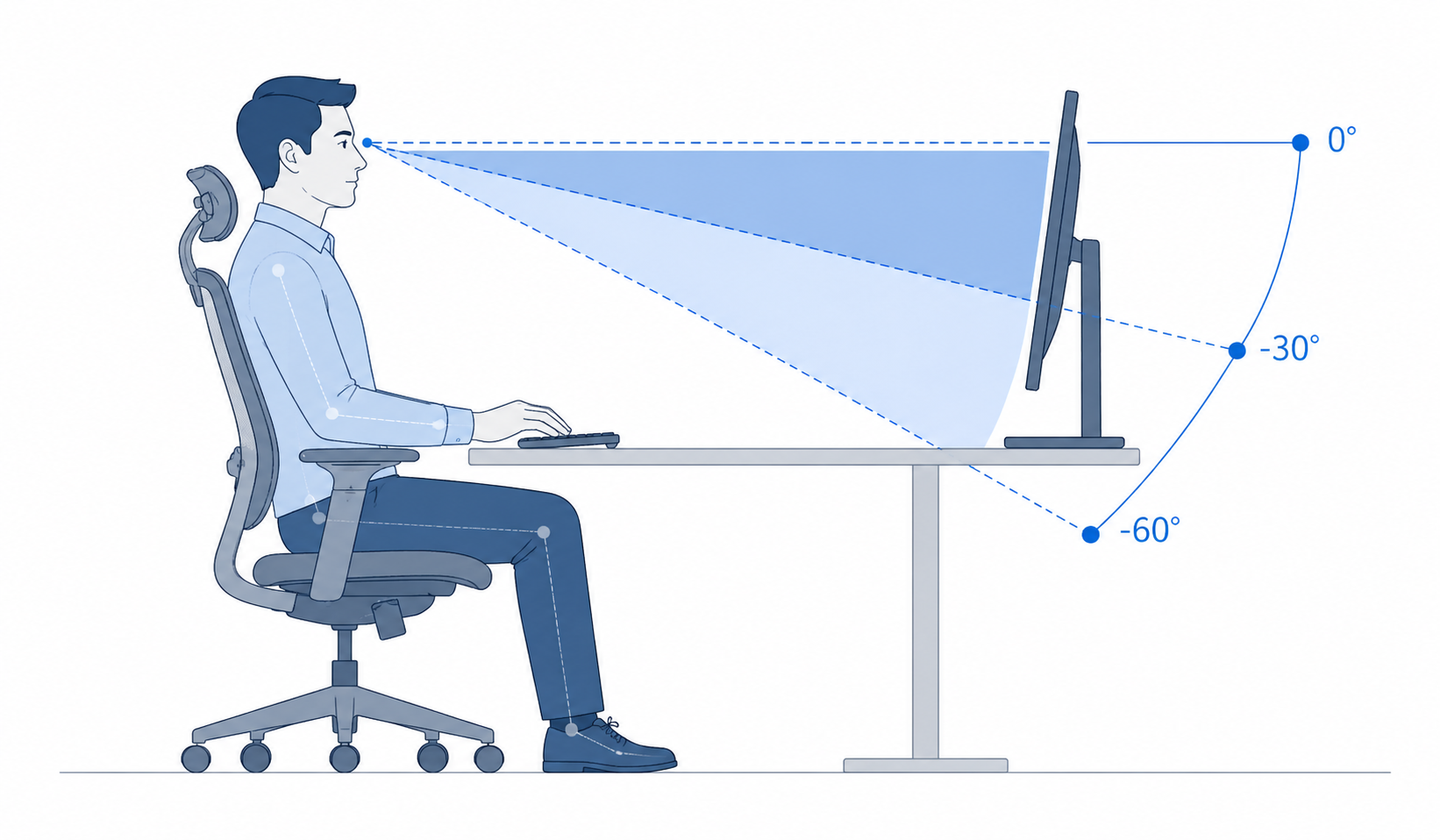
Diagram illustrating vertical field of view zones for monitor viewing
Vertical viewing zone diagram showing the eye line, monitor position, optimal viewing zone and secondary viewing zone used in this tool.
Illustration of a multi-monitor workstation with portrait and landscape screens
Multi-monitor arrangement diagram showing how landscape and portrait monitors may be arranged for office workstation use.

Calculate monitor distance from field of view

Select up to three monitors. Each monitor can be set as landscape or portrait. The tool assumes the monitors are arranged side-by-side in a horizontal row and calculates the distance based on the total visual width and maximum screen height.

Approximate gap or bezel allowance in cm.
For multi-monitor setups, this refers to the highest top edge.
Optional. Enter in cm to compare your current setup.

Monitor 1

Diagonal size in inches.

Monitor 2

Diagonal size in inches.

Monitor 3

Diagonal size in inches.
Optional. Available distance from user to monitor position, in cm.
Recommended distance for full monitor setup
100 cm or more
Full setup within optimal viewing zone
Conservative ±35° reference 50 cm
Combined display envelope 53 × 30 cm
Display arrangement visualisation
Viewing angle at your current or recommended distance
Horizontal
±45°
Vertical
0° to -17°
Recommendation: Enter your monitor details and calculate the distance needed for the full display setup to fit within the preferred field of view.

Friendly reminder: This tool is intended as a simple guide to help users think about monitor viewing distance and screen arrangement. It is based on simplified field-of-view geometry and does not replace a professional workstation assessment, vision assessment, medical advice, or a detailed ergonomics evaluation. If you or your team experience eye strain, neck discomfort, shoulder pain, or need support with a complex workstation setup, IEH recommends seeking professional ergonomics advice.

Need help with a real workstation setup?

This calculator gives a useful starting point, but every workstation and user is different. For office ergonomics assessments, multi-monitor workstation reviews, discomfort cases, or workplace-wide ergonomics programmes, IEH can provide professional ergonomics and human factors support.
Contact IEH View Ergonomics Services
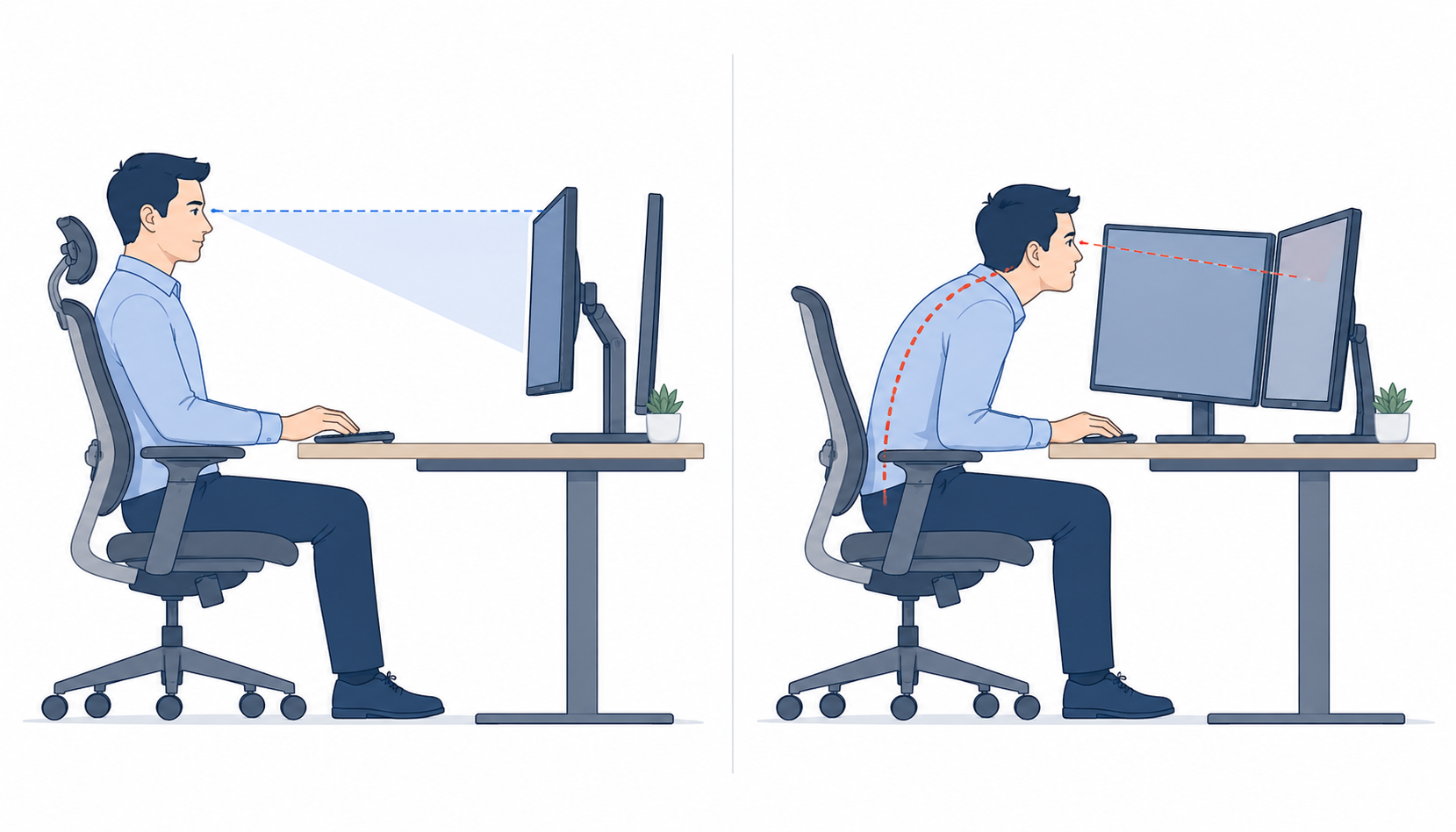
Comparison illustration showing good monitor setup and poor monitor setup
Good versus poor monitor setup comparison showing appropriate viewing distance, monitor height and posture.

1. Use the primary monitor in front

The most frequently viewed monitor should be placed directly in front of the user. Secondary monitors should be angled inward and used for reference or occasional viewing.

2. Large arrays increase viewing distance

Two or three monitors create a wider visual envelope. If the full array must remain within the optimal field of view, the required distance may be much greater than typical arm’s-length guidance.

3. Portrait screens change the limiting factor

Portrait monitors are narrower but taller. This may reduce horizontal visual demand while increasing vertical viewing demand, especially if the top edge is above eye level.
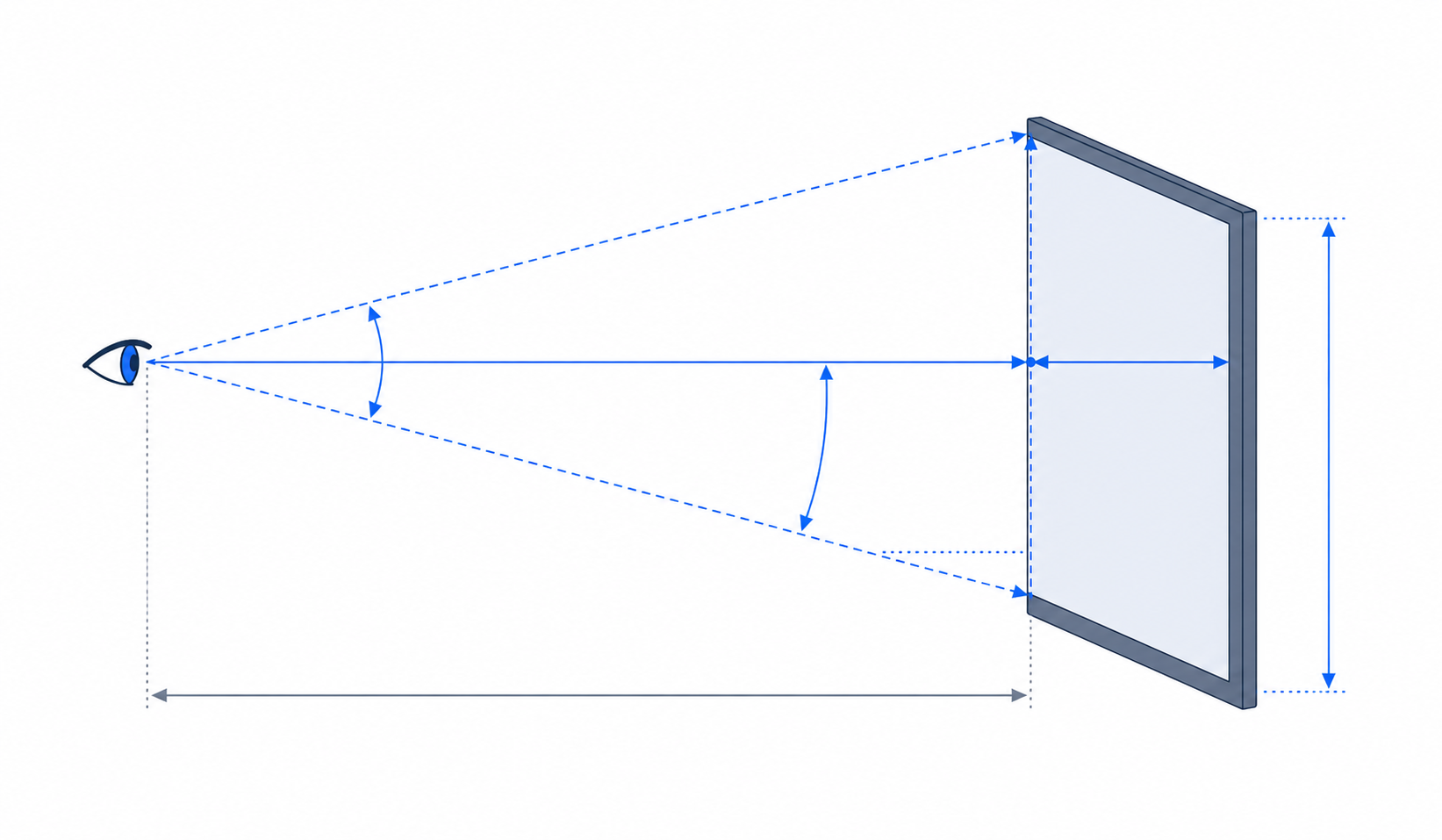
Technical diagram showing how monitor viewing distance is calculated
Calculation method diagram showing how monitor width, monitor height, eye position and viewing angles are used to estimate viewing distance.

Calculation method

Each monitor diagonal size and aspect ratio is converted into physical screen width and height. If portrait orientation is selected, the width and height are swapped.

For a side-by-side monitor row, total display width is calculated as: sum of monitor widths + gaps between monitors.

The display height is calculated using the tallest active monitor. Horizontal viewing distance is calculated from the half display width and the horizontal field-of-view limit. In this version, the optimal horizontal viewing angle is set at ±45°: distance = half display width ÷ tan(horizontal angle).

Vertical viewing distance is calculated from maximum screen height, top-edge angle and the lower vertical viewing limit: distance = screen height ÷ (tan(top edge angle) - tan(lower viewing angle)).

The final recommended distance is the larger value from the horizontal and vertical calculations, because the display setup must satisfy both criteria.

  • What is heat stroke? Workplace Safety and Health
  • We are exhibiting at 23rd World Congress! IEH Training and Events
  • Singapore’s Path to Competency in Respiratory Protection Management Workplace Safety and Health
  • Ergonomics & Hygiene 2022 IEH Training and Events
  • IEH will be heading to APOSHO36

    IEH is proud to announce that Mr Zephan Chan (IEH Director) and Ms Phoebe Huang Xian (Head of Ergonomics) will be giving a presentation titled “Ergonomics and Occupational Hygiene: A Holistic Approach to Manage Workplace Health” at the upcoming APOSHO36, held in Melbourne from 23 to 25 November 2022. Do look forward to it! https://aposho36.com.au/

  • Modern Features on Instruments to Improve your Noise Monitoring Exercise Workplace Safety and Health
  • People Can Still Die in a Safe Workplace Workplace Safety and Health
  • EXO Debut in Australia Ergonomics

SIGN UP OUR MAILING LIST

LOCATE US
Singapore:
IEH (Institute of Ergonomics and Hygiene) Pte Ltd
11 Collyer Quay
#14-08 The Arcade
Singapore 049317

United States:
Institute of Ergonomics and Hygiene LLC
3400 Cottage Way, Suite G2
#8920, Sacramento, California 95825,
United States

CONTACT US
T: +65 6914 6620 / +65 6224 4409
WA: +65 9770 5963
E: Consulting@ieh.sg (Consulting)
E: Training@ieh.sg (Training)
Careers: ieh.sg/careers/

  • LinkedIn
  • Facebook
  • Twitter

Copyright ©2026 IEH (Institute of Ergonomics and Hygiene) Pte Ltd

Powered by PressBook News WordPress theme

WhatsApp Us
WhatsApp Us